

Messages Displayed on the Filling Station Message Board
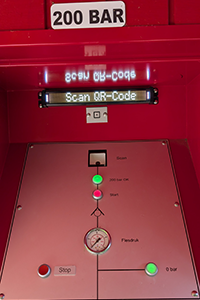
To make the filling station easier to use and more user-friendly, an information display has been installed on each filling console. This display guides you through the filling process step by step and continuously shows the current status of the console.
If a problem occurs, the QR scanner will illuminate red and a clear message will be displayed. This allows you to quickly identify the cause of the problem and, if necessary, take the appropriate action to continue the filling process safely and correctly.
Below you will find an overview of the messages that may appear on the display, together with their meaning and the recommended action.
| Message | Meaning and recommended action |
|---|---|
| Scan QR-code | The filling console is ready for use. Scan your QR code to fill your scuba cylinder. |
| Druk Start / Stop | Press the Start button to start the filling process. Press the Stop button to end the filling process. |
| Onvoldoende druk | Check whether you can hear the compressor running. If you can hear it, please wait a moment. The compressor is currently filling the buffer cylinders. If you cannot hear it, the compressor may have stopped and maintenance is required. |
| Onvoldoende saldo | Your filling credit is insufficient. Purchase a new filling subscription to use the filling station again. |
| Vervallen QR-code | The permit linked to the scanned QR code has expired. You may already have a new permit and only need to retrieve the new QR code via the website or app. Check the website or app to verify that an active permit is linked to your account. |
| Koppel QR-code | The scanned QR code is not yet linked to an account. Open the website or app and link the permit to your account. |
| Ongeldige QR-code | The scanned QR code is invalid. Filling is only possible with a valid diving permit that is valid for one or three years. Day passes cannot be used at the filling station. |
| QR-code locked | The scanned QR code is blocked. Check the website or app to verify whether your filling card has the status Blocked. Unblock the filling card before trying to fill again. |
| Proces beëindigd | The Start button was not pressed within 30 seconds, or the Stop button was pressed during or after filling. Scan your QR code again if you wish to resume the filling process. |
| Fout, probeer opnieuw | An error occurred while retrieving your filling credit or registering the filling operation. There may be a problem with the Internet connection, or the AVOS website may be temporarily unavailable. Please wait a moment and try again. |
| Booting ... | The filling console is starting up. This may take a few moments. |
| Tijdelijk buiten gebruik | The filling console is restarting. Please wait a moment; it will be available again shortly. |
| Buiten dienst | The filling station or filling console is temporarily out of service due to maintenance. Please try again later or contact the administrator. |





 200 Bar Left